Building a Pragmatic AI Portfolio Agent with FastAPI, Pydantic AI, and BM25
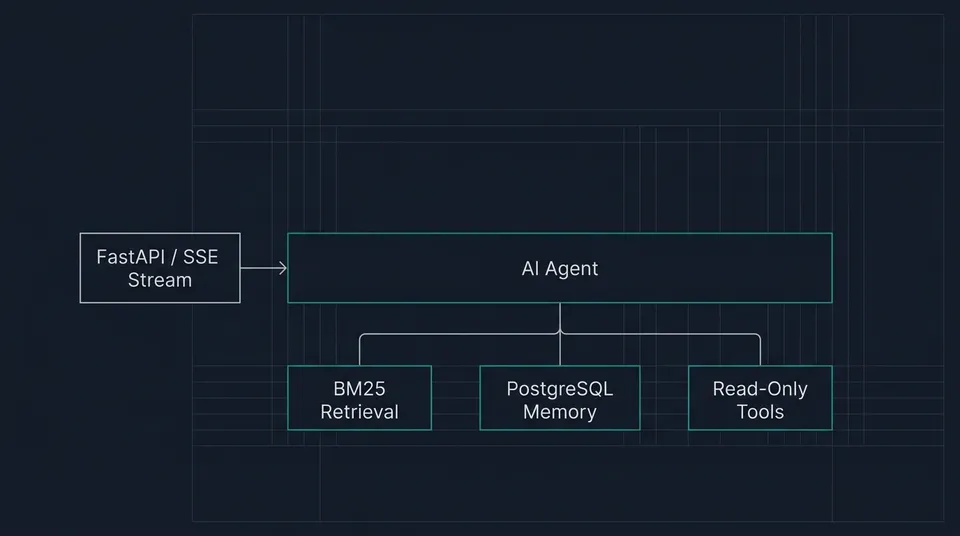
Table of Contents
- What I built
- Design philosophy: Less is more
- Retrieval: Why lexical BM25 beats vector search for this scale
- System structure & SSE streaming
- Persistence, rate limits, and security controls
- Lessons learned
- Try it live
I built a fast, deterministic portfolio search layer with a direct natural-language entry point, avoiding an over-engineered conversational chatbot.
What I built
A portfolio website normally relies on static navigation. Visitors manually click through project lists, experience entries, tech stacks, and blog articles to piece together what an engineer has built.
I wanted to give visitors a more direct, conversational entry point. Instead of digging through multiple pages, a visitor can ask questions like:
- "What projects involve AI agents?"
- "Which project uses MCP for production support?"
- "What experience do you have with PostgreSQL and Go?"
- "Have you written anything about system design?"
To support this, I built an AI assistant embedded in my portfolio website.
The application backend is built with Python and FastAPI. It ingests published portfolio data, indexes that content using an in-memory BM25 lexical engine, exposes a set of typed read-only tools to a Pydantic AI agent, persists conversation turns in PostgreSQL, and streams response deltas to the frontend using Server-Sent Events (SSE).
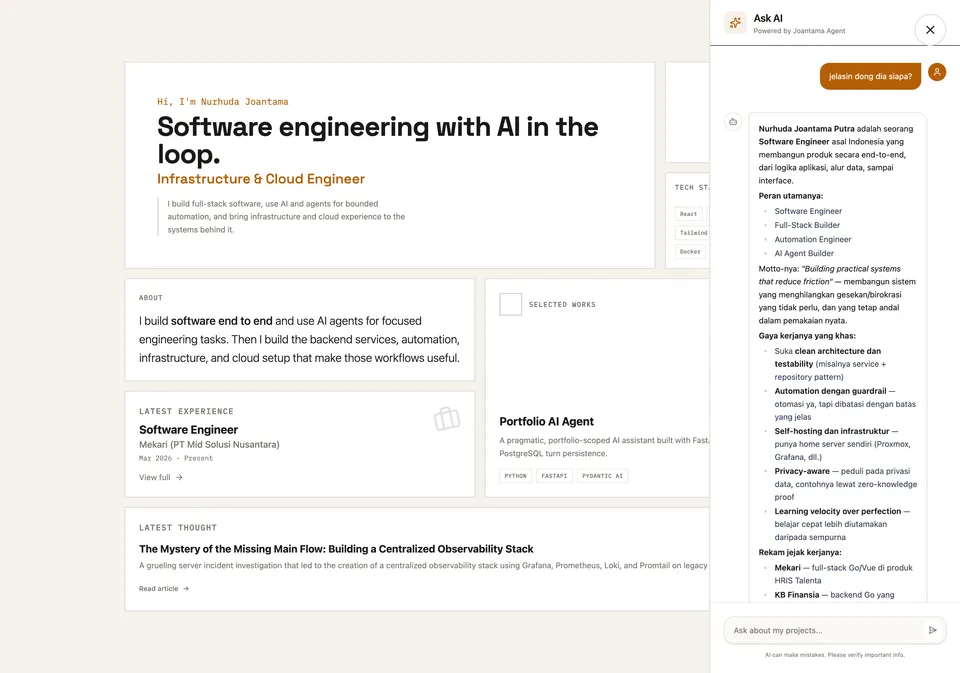 Ask AI responding with profile details
Try it live: Click the chat widget in the bottom corner of this page and ask:
What projects involve AI agents?
Design philosophy: Less is more
When building AI tools, it is tempting to create dozens of specialized tools for every field and collection: list_projects, get_project, list_experiences, get_experience, list_blogs, get_blog, get_profile, get_tech_stack, search_knowledge, and so on.
However, exposing too many tool schemas causes immediate drawbacks:
- Token Overhead: Every tool declaration adds schema parameters to every prompt.
- Model Confusion: Similar tools increase decision ambiguity and accidental misuse.
- Latency & Cost: Larger schemas degrade model turn performance.
Instead of exposing dozens of internal domain functions, I simplified the public tool surface down to seven read-only tools:
search_knowledge: BM25 keyword search across all portfolio content.get_profile: Singleton lookup for background and tech arsenal.list_projects&get_project: Project list and detail lookups.list_experiences&get_experience: Career experience lookups.get_blog: Blog article lookup by slug.
Why Pydantic AI Core?
I chose Pydantic AI because it provides clean Python primitives: typed tools, message history, provider abstractions, and streaming events.
I used Pydantic AI Core specifically, avoiding heavier agent harnesses (such as OpenCode SDK, Claude Agent SDK, or OpenAI Agents SDK). Heavy harnesses bring filesystem access, shell execution, subagent orchestration, and code-mode loops. While useful for autonomous coding systems, those features are overkill for a portfolio knowledge assistant.
The assistant's only job is:
Understand Question → Retrieve Portfolio Content → Synthesize Answer
By keeping the agent surface small, the system remains fast, predictable, and cheap to run.
Retrieval: Why lexical BM25 beats vector search for this scale
For RAG applications, the default approach is usually an embedding pipeline, a vector database, and semantic similarity search.
For a personal portfolio, vector search adds extra moving parts without improving search results.
Portfolio queries almost always contain specific domain keywords: FastAPI, Pydantic AI, PostgreSQL, Go, OpenCode, MCP, or SSE.
Using BM25 (via the bm25s Python library) keeps retrieval simple and fast:
- Zero Embedding Costs: No extra API calls to generate embeddings during ingestion or querying.
- Zero Database Infrastructure: The index is built in memory on service startup in milliseconds.
- Explainable Ranking: Results are deterministically scored based on term frequency and document length.
In-Memory Indexing and Tokenization
The BM25 index is initialized and built in memory on service startup by tokenizing document chunks:
self._search_documents = search_documents
self._bm25 = bm25s.BM25()
if search_documents:
    self._bm25.index(
        bm25s.tokenize([document.text for document in search_documents])
    )
Section-Level Chunking with Parent Context
For long-form Markdown blogs, searching full pages returns too much noise, while searching micro-paragraphs loses context.
The catalog uses H2 section-level chunking:
- Profile, Projects, Experiences: Indexed as whole structured JSON documents.
- Blogs: Split by
H2headings usingpython-frontmatterandmarkdown-it-py.
To prevent the LLM from losing the overall argument when retrieving a single section, each BM25 chunk attaches document-level context:
{
  "kind": "blog",
  "slug": "building-ai-portfolio-agent",
  "document_title": "Building a Pragmatic AI Portfolio Agent",
  "document_summary": "An article about simple agent architecture, BM25 retrieval, and SSE streaming.",
  "section": "Retrieval",
  "content": "..."
}
This gives the model local precision alongside global context without passing the entire article into the context window.
Scoring and Threshold-Filtered Search
When searching, candidates are retrieved, annotated with their relevance scores, and filtered to ensure only high-confidence matches are returned:
def search(self, query: str, limit: int = 5) -> list[SearchResult]:
    """Search public content using the notebook's weighted BM25 strategy."""

    if not query.strip() or not self._search_documents or limit < 1:
        return []
    count = min(limit, _MAX_SEARCH_RESULTS, len(self._search_documents))
    document_ids, scores = self._bm25.retrieve(bm25s.tokenize([query]), k=count)
    results = [
        self._search_documents[document_id].result.model_copy(
            update={"score": float(score)}
        )
        for document_id, score in zip(document_ids[0], scores[0], strict=True)
    ]
    if not results:
        return []
    top_score = results[0].score
    return [
        result
        for result in results
        if result.score >= 0.5 and result.score >= top_score * 0.4
    ]
Try it live: Ask the chat assistant:
Which project uses MCP for production support?
System structure & SSE streaming
The backend separates the HTTP transport from the core agent, retrieval, and persistence logic:
Public Portfolio Data
  ├─ content/blogs/*.md
  ├─ content/projects.json
  ├─ content/experiences.json
  └─ content/profile.json
          │
          ▼
PortfolioCatalog (retrieval.py)
  ├─ Data parsing & validation
  ├─ Direct O(1) dictionary lookups
  └─ In-memory BM25 index
          │
          ▼
PortfolioAgent (agent.py)
  ├─ Portfolio-only system instructions
  ├─ 7 read-only retrieval tools
  └─ Typed event stream generator
          │
          ▼
FastAPI App & Router (api.py)
  ├─ Health & conversation history endpoints
  └─ POST /v1/chat/{conversation_id}/stream (SSE)
          │
          ▼
PostgreSQL Store (store.py / rate_limit.py)
  ├─ Conversation turns (running, completed, failed)
  └─ Rolling-window rate-limit records
Server-Sent Events (SSE) Lifecycle
The POST /v1/chat/{conversation_id}/stream endpoint streams typed SSE events so the UI can render smooth progress states:
| Event Type | Purpose |
|---|---|
state | Signals tool usage or progress (e.g., searching_knowledge, getting_project). |
text | Streams text deltas as the assistant synthesizes its answer. |
done | Indicates run completion with final status metadata. |
error | Emits sanitized error messages if a run fails. |
Before emitting events to the client, the API sanitizes sensitive internal payload data, stripping raw tool parameters, internal function names, and model usage numbers.
Persistence, rate limits, and security controls
Conversation Turn Persistence
Conversation history is stored in PostgreSQL with explicit turn states: running, completed, or failed. A partial unique index prevents concurrent running turns for the same conversation ID.
When restoring history for the model context, the agent restricts restored context to the latest 6 completed turns, keeping prompt sizes predictable and bounded.
Database Advisory Lock Rate Limiting
To protect public endpoints from abuse without adding Redis complexity, the app uses a PostgreSQL-backed rolling-window rate limiter.
It enforces two rate limits per 180-second window:
- 10 requests per conversation ID
- 25 requests per canonical client IP address
The limiter computes SHA-256 digests of client keys and uses transaction-scoped PostgreSQL advisory locks (pg_advisory_xact_lock), ensuring safe concurrent enforcement directly inside PostgreSQL.
Security Boundaries
- Retrieved Data as Data, Not Code: Prompts explicitly instruct the model that retrieved portfolio content is reference data, not instructions.
- Read-Only Scope: Tools are purely read-only regarding portfolio content.
- Prompt Boundaries: Prompts are capped at 4,000 characters.
- Transport Protections: CORS origin restrictions, host validation, body size limits, and
nosniff/no-storeheaders.
Lessons learned
1. Token efficiency is a feature, not just a cost control
Building a production agent taught me that token optimization directly impacts user experience. By pruning tool schemas, capping chat history to 6 completed turns, and indexing Markdown by section instead of entire documents, I cut context window bloat by over 60%. The result was faster Time-To-First-Token (TTFT) and cheaper API execution without degrading answer quality.
2. High-quality answers come from context design, not max tokens
Sending an entire 3,000-word blog post into the context window actually hurt response relevance. Providing concise, section-level chunks paired with lightweight parent metadata (title and summary) gave the LLM exact context precision. The model synthesized better, more focused answers when fed targeted information rather than massive context dumps.
3. Let code handle precision, let LLMs handle language
Deterministic Python lookups and BM25 scoring handle exact keyword retrieval without consuming model tokens or risking hallucinations. Reserving the LLM for intent understanding and response synthesis kept prompt sizes low and responses predictable.
Try it live
The portfolio agent is running right now!
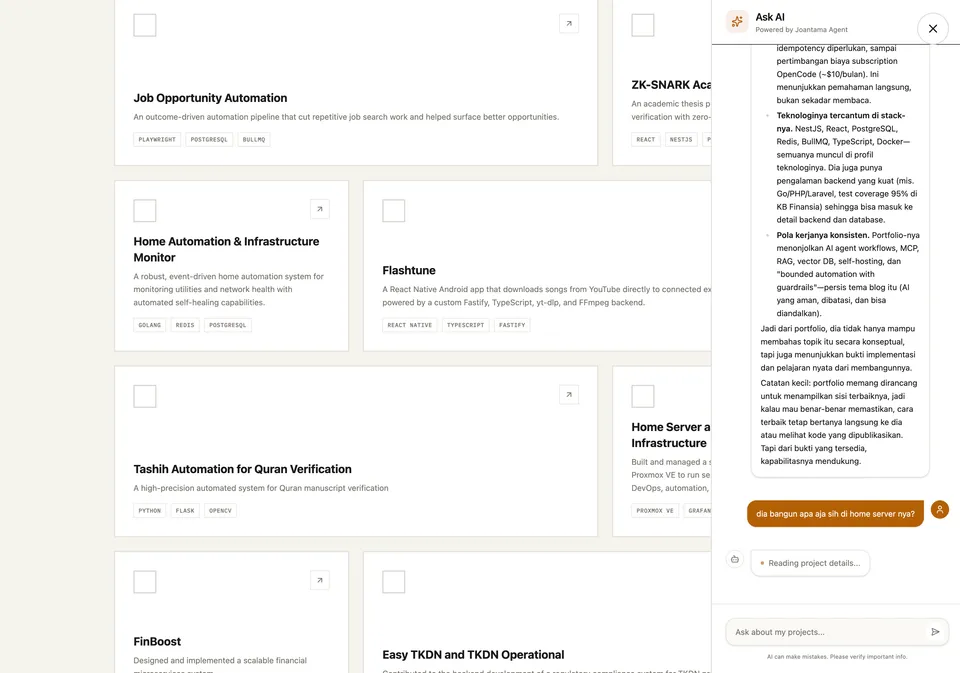 Ask AI retrieving and answering project details
Feel free to open the chat widget in the lower corner of the screen and test it with questions like:
- "What kind of engineer are you based on your experience?"
- "Summarize the article about OpenClaw as an operating layer."
- "Show me projects built with Python and PostgreSQL."