Building an AI-Assisted On-Call Maintenance Workflow
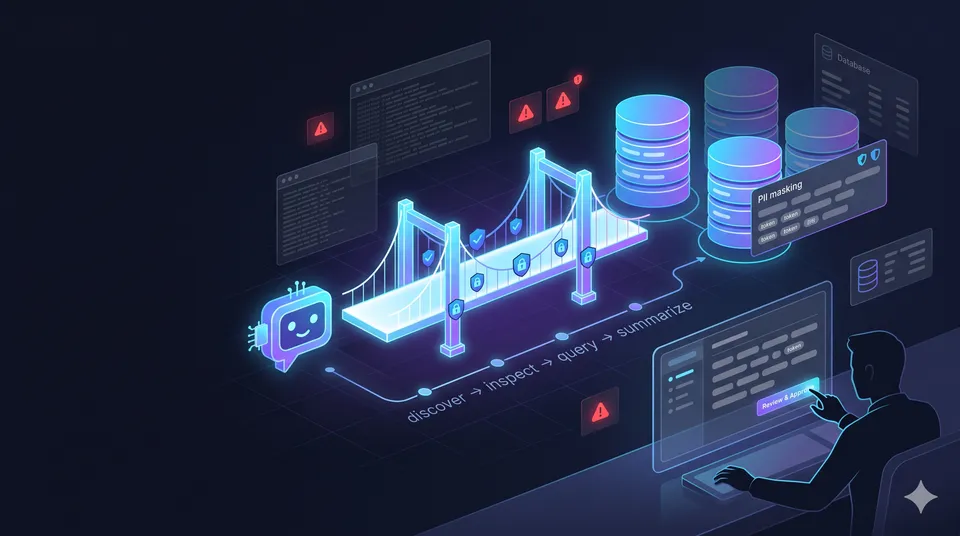
Table of Contents
- The repetitive part of on-call work
- Why I did not want raw database access for AI agents
- Using MCP as a controlled access layer
- The tool flow: discover, inspect, query
- Making the workflow safer with mapping, limits, and masking
- What changed after using it
- Lessons learned
The useful AI workflow was not the one that gave the agent more freedom. It was the one that gave the agent a narrow, safer path to the data it actually needed.
I recently built a small internal workflow to help with a very familiar kind of engineering work: on-call data investigation.
Not the dramatic part of on-call work where everything is on fire. I mean the quieter, repetitive part. A case comes in, I need to understand what happened, and most of the time is spent checking operational data across internal systems.
The hard part was not always the fix itself.
A lot of the time was spent finding the right database, remembering which table mattered, searching with the right identifier, checking related rows, and making sure I did not casually expose sensitive data while using AI tools to help reason through the case.
That was the problem I wanted to improve.
I did not want an AI agent that could freely query everything. I wanted a safer workflow where the agent could help me investigate faster, but only through a controlled interface that I designed intentionally.
That is where MCP became useful.
1 · The repetitive part of on-call work
In many maintenance cases, the investigation pattern is surprisingly similar.
I usually need to:
- identify which internal data source is relevant
- remember which mapped table contains the right information
- search using a case identifier, user reference, or business key
- inspect a few related rows
- connect the result back into a short explanation
- avoid exposing raw personal data unnecessarily
None of that is especially complex by itself.
But doing it manually over and over again adds friction. The context is often scattered between notes, database knowledge, past cases, table meanings, and the small habits engineers build after touching the same systems many times.
This is exactly the kind of work where an AI assistant can help. It can summarize, follow a trail, ask the next reasonable question, and turn a few data points into a clearer explanation.
But there was one obvious problem.
Giving an AI assistant unrestricted database access is not something I am comfortable with.
Raw SQL access would be too broad. It could query the wrong thing, return too much data, expose private fields, or create a workflow that is hard to audit later. Even if the assistant is only trying to help, the boundary would be too loose.
So the goal became more specific:
How can I let an AI assistant help with investigation without giving it direct database access?
2 · Why I used MCP
At a high level, Model Context Protocol is a way for an AI application to connect with external tools and data through a standard interface.
The part I cared about was simple: instead of asking the model to write raw SQL, I could expose a small set of predefined tools.
That changes the shape of the workflow.
The AI assistant does not need to know the real database topology. It does not need to build arbitrary queries. It does not need to see every table or every column. It only sees the capabilities the MCP server chooses to publish.
In my case, the MCP server became a controlled bridge between the assistant and operational data.
The server owns the rules:
- which logical databases are visible
- which tables are mapped
- which columns can be returned
- which fields can be searched
- how many rows can come back
- how sensitive values are masked
- how tool usage is logged
That made MCP a good fit for this problem. It let me turn internal operational knowledge into structured tools the agent could use, while keeping the risky parts behind a backend boundary.
The stack itself was not exotic. I built the backend with TypeScript, connected it to internal relational databases, and exposed the workflow through MCP tools. The important part was not the stack choice. The important part was the access model.
The agent could ask for help.
The server stayed in control.
3 · The tool flow: discover, inspect, query
I kept the first version intentionally narrow.
The MCP server exposed a small set of read-only tools:
1. get_database_available
This returns the logical database aliases that the agent is allowed to know about.
I use aliases instead of exposing internal names directly. The point is not to teach the AI assistant everything about the infrastructure. The point is to give it enough context to choose the right mapped data source.
2. get_table_available
After choosing a database alias, the agent can ask which mapped tables are available.
Again, this is intentionally curated. A table only appears if I manually mapped it and decided it is useful for investigation.
3. get_table_info
This explains what a table means, which columns are visible, and which fields can be searched.
This part turned out to be more important than I expected. Good descriptions make the agent much better at deciding what to do next. Without that metadata, the assistant is just guessing from names.
4. get_data
This fetches rows from one mapped table using controlled filters.
There is no arbitrary SQL. The agent cannot join random tables, scan everything, or decide its own projection. It can query one mapped table at a time, using only allowed searchable fields, with a maximum result limit.
The flow is simple but effective:
discover the database → discover the table → inspect the table info → query with safe filters
That step-by-step flow also makes the assistant easier to supervise. I can see how it reached a result instead of getting one mysterious answer from a hidden query.
4 · The boundaries are part of the product
One lesson I keep relearning with AI tools is that boundaries are not just security decoration.
They are part of what makes the workflow usable.
For this MCP server, I made a few choices very deliberately:
- access is read-only
- no arbitrary SQL is exposed
- each query targets one mapped table
- databases and tables are manually mapped
- visible columns are allowlisted
- searchable columns are allowlisted
- every query has a maximum result limit
- HTTP access uses bearer authentication
- tool usage is written into an audit trail
The goal was not to make the AI powerful by giving it everything.
The goal was to make it useful by giving it only the right things.
Manual mapping might sound like a limitation, but for this kind of workflow I see it as a feature. It forces every exposed data source to be intentional. If a table is not mapped, the agent cannot access it. If a column is not marked visible, it does not appear. If a field is not marked searchable, it cannot be used as a filter.
That makes the system slower to expand, but easier to trust.
For on-call investigation, I prefer that trade-off.
5 · PII masking was not an afterthought
The privacy boundary mattered from the beginning.
Some operational data contains personal information. Even in a read-only workflow, I did not want raw names, emails, phone numbers, identifiers, or similar fields to flow freely into AI responses.
So the table mapping can mark certain columns as PII.
When those values are returned to the assistant, the MCP server masks them first. Instead of returning a raw value, it returns a partially readable masked token. The assistant can still use that token in a later query, but the sensitive raw value stays behind the MCP boundary.
That small detail changed the workflow a lot.
The agent can still reason about whether two rows refer to the same person or record. It can still continue an investigation using the masked reference. But it does not need to see the actual private value to be useful.
The masking is stable enough for follow-up investigation, and the raw value is resolved internally only when the server needs it for a controlled lookup.
That was the balance I wanted:
- useful enough for investigation
- structured enough for repeatability
- private enough to avoid casual exposure
PII handling is much harder to add later after a workflow already depends on raw data. For AI-assisted tools, I think it needs to be part of the design from day one.
6 · How the workflow feels now
Before this, a common maintenance investigation felt like a manual checklist.
I had to remember table names, write queries, inspect rows, copy small pieces of context, avoid exposing sensitive fields, and then summarize what I found.
Now the flow feels more guided.
I can ask the assistant to investigate a case. It discovers the mapped data source, checks table information, queries with safe filters, and gives me a concise summary of what it found. Sensitive fields come back masked, and I can still review the actual tool calls if I need to understand how it reached the answer.
It is not full automation.
It does not fix production issues by itself. It does not replace engineering judgment. It does not mean the assistant is always right.
What it does is remove a lot of repetitive lookup work.
From my own usage, this covered around 80% of the recurring investigation cases I usually handle. For those cases, the investigation time felt more than 5x faster compared to the previous manual workflow.
I do not treat that like a scientific benchmark. It is just the practical result I felt after using it in real maintenance work.
The biggest win was not only speed.
The bigger win was that the workflow became repeatable. Instead of relying on memory every time, the operational knowledge now lives in a controlled tool layer the assistant can use consistently.
7 · What I chose not to automate
One important boundary: I did not build this as an autonomous operator.
The system helps with investigation and context gathering. It does not make final decisions for me. It does not write data. It does not run maintenance actions. It does not silently perform recovery work.
That was intentional.
For this kind of internal workflow, I want the engineer to stay in the loop. The assistant can speed up the boring investigation path, but the human still reviews the result, understands the context, and decides what to do next.
That boundary makes the system feel more practical, not less powerful.
I trust it more because it is not trying to do everything.
8 · Lessons learned
Looking back, a few lessons stood out.
Start read-only first
Read-only access is already enough to create a lot of value. In many on-call cases, investigation is the biggest time sink. You do not need write access to make the workflow meaningfully faster.
Manual mapping is a feature, not a limitation
Manual mapping forces the system to expose only intentional data. It also makes the assistant more reliable because each table has a clear description, visible columns, and searchable fields.
Do not give agents raw SQL too early
Structured tools are easier to validate, limit, audit, and explain. Raw SQL may feel flexible, but flexibility is not always the right goal when sensitive operational data is involved.
PII handling must be designed from the beginning
Masking works best when it is part of the core workflow. If raw sensitive values become normal early, it is much harder to tighten the boundary later.
Good tool descriptions matter
The assistant performs better when the MCP tools and table descriptions are clear. A useful AI workflow is not only about model quality. It is also about the quality of the interface you give the model.
9 · Closing thoughts
This project reminded me that the best AI workflow is not always about giving the model more freedom.
Sometimes the better approach is to design a narrow, safe interface where the assistant can be very effective.
For my on-call maintenance work, that interface was an MCP server: read-only, mapped, limited, masked, and auditable.
It turned a repetitive manual lookup process into guided, AI-assisted exploration. It made common investigations faster. More importantly, it made the workflow safer and more repeatable.
If there is one sentence I would keep from this project, it is this:
AI agents are most useful in operational work when they are connected to narrow, well-designed tools instead of unrestricted access.